Now Reading: Xfinity xFi Complete: Is the $25 Monthly Add-On Actually Worth It?
-
01
Xfinity xFi Complete: Is the $25 Monthly Add-On Actually Worth It?

Over 70% of households streaming in 4K or managing remote work setups burn through more data than they realize, often triggering surprise overage fees. Cable giant Comcast imposes a 1.2 Terabyte (TB) monthly data cap across standard home plans in most of its market regions. For power users, hitting that cap means paying an extra $10 for every additional 50 GB of data.
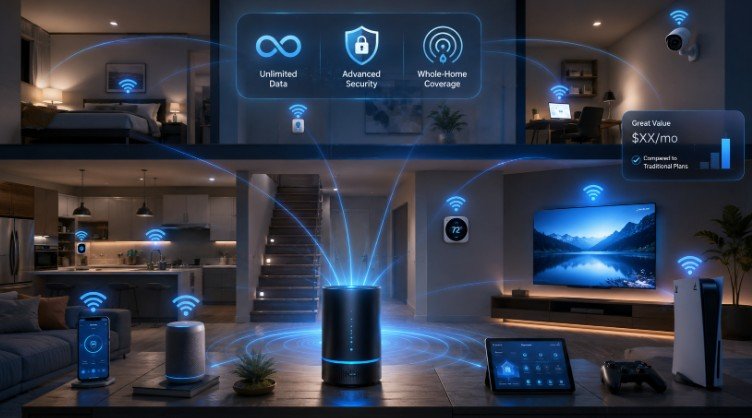
To eliminate these overage charges while providing hardware upgrades, Comcast offers xFi Complete—a comprehensive equipment and service add-on bundle designed to give internet subscribers unlimited bandwidth and smart home management tools. But with price points shifting across regions, calculating its true financial value requires looking beyond basic promotional marketing.
What Is xFi Complete and What Does It Package?
At its core, xFi Complete is an all-in-one upgrade package for subscribers using Comcast’s Xfinity Internet service. Instead of paying ala carte for modem rentals, security features, and unmetered data, this subscription rolls all four core utility components into a single monthly line item (typically billed as a flat $25 add-on fee).
The bundle explicitly packages five core service offerings:
- Unlimited Data: Completely removes the standard 1.2 TB monthly data cap, preventing unexpected overage penalties.
- xFi Gateway Rental: Covers the monthly lease fee for Xfinity’s proprietary modem/router combo unit (such as the XB7 or XB8 Wi-Fi 6E models).
- Whole-Home Wi-Fi Evaluation: An automated 14-day network monitoring diagnostic that assesses connection strength across all physical rooms in your residence.
- Free xFi Pods (If Eligible): If the 14-day evaluation detects persistent dead zones, Xfinity provides mesh network extension pods at no additional cost.
- Advanced Security: Activates real-time threat monitoring, automated phishing shields, and parental controls accessible via the official smartphone app.
Breaking Down the Math: Standalone Pricing vs. The Bundle
Evaluating whether this add-on makes sense comes down to a straightforward comparison of standalone line items. Under standard pricing structures, leasing an xFi Gateway separately costs roughly $15 per month. Purchasing an unmetered, unlimited data add-on as a standalone feature costs an additional $30 per month.
By combining these standalone line items into one subscription package, users typically realize significant savings over buying services separately:
| Feature Line Item | Standalone Pricing | Packaged via xFi Complete | Monthly Savings |
| xFi Gateway Rental | $15 / month | Included | — |
| Unlimited Data Add-on | $30 / month | Included | — |
| Mesh WiFi Pods | ~$119 (One-time purchase) | Included (if qualified) | — |
| Total Monthly Cost | $45 / month | $25 / month | $20 / month |
For household networks that already rent an Xfinity modem and regularly exceed data limits, switching to the combined tier saves approximately $240 per year while unlocking automatic mesh hardware eligibility.
Digital Demands: Who Needs Unmetered Data in 2026?
According to data usage reports from the Federal Communications Commission (FCC), average household internet consumption has scaled dramatically alongside high-definition video streaming, remote working, and smart home proliferation.
The 1.2 TB threshold might sound vast, but modern bandwidth demands consume it faster than expected:
- 4K/8K Media Enthusiasts: Ultra-high-definition video consumes roughly 7 GB to 11 GB of data per hour. A household streaming 5 hours of 4K content daily will burn through nearly 1.2 TB per month on video alone.
- Modern Video Gamers: Modern game releases frequently exceed 100 GB to 150 GB per download, not including frequent multi-gigabyte patches.
- Remote Work Professionals: Daily video conferencing, cloud file syncing, and routine system backups quickly add up over a standard work month.
- Large Smart Homes: Multiple smart TVs, security cameras uploading HD video streams to the cloud, and mobile devices constantly running in the background create ongoing passive data consumption.
Step-by-Step: The 14-Day Whole-Home Wi-Fi Audit
One of the most valuable aspects of the package is the automated hardware assessment. Here is how the 14-day network diagnostic process works in practice:
1.Activation & Monitoring:First 14 Days.
Once your gateway is active, Xfinity monitors signal strength, device performance, and packet loss across every connected room without collecting personal activity data.
2.Diagnostic Analysis:Day 15.
The system analyzes floor-plan dead zones and checks if any connected devices suffer from signal degradation or latency drops.
3.Results & Pod Delivery:Post-Evaluation.
If weak zones are detected, you receive an email notification with instructions to redeem a free xFi Pod mesh extender. If your connection is solid, the system continues running automated network optimizations in the background.
Important Exceptions: When You Should Skip xFi Complete
While the add-on offers clear value for heavy data users, it is not a universally necessary purchase for every household setup.
1. You Own Your Own Modem and Router
If you prefer using high-end third-party hardware (such as a custom modem and mesh router system), paying a monthly gateway rental fee makes little financial sense. While you can purchase standalone unlimited data for your own equipment for $30/month, the $25 bundle specifically requires using Xfinity’s rented gateway modem.
2. Next-Gen / Higher-Tier Speed Inclusion
Subscribers on Xfinity’s newer “Next-Gen” speed tiers or premium Gigabit x2 plans may already have gateway rentals and unlimited data included in their base monthly rate. Always review your baseline bill details before adding extra line items.
3. Light Internet Consumers
Households that primarily use the internet for web browsing, social media, and moderate 1080p streaming rarely exceed the standard 1.2 TB data cap. Consumer education resources from the National Telecommunications and Information Administration (NTIA) show that low-to-moderate internet households average well under 500 GB per month, making unmetered add-ons an unnecessary expense.
Frequently Asked Questions
1. Do I get free mesh pods immediately after signing up?
No. You must complete a 14-day Whole-Home Wi-Fi Evaluation first. Xfinity only ships free xFi Pods if their automated system detects persistent dead zones or weak signals in your home during the test period.
2. Can I use xFi Complete with my own modem?
No. The xFi Complete bundle requires leasing and using an official xFi Gateway modem/router combo provided by Xfinity. If you prefer personal hardware, you must purchase the standalone unlimited data add-on instead.
3. What happens if I go over 1.2 TB without xFi Complete?
Xfinity typically provides a one-time courtesy allowance for first-time overages. After that, you are charged $10 for every additional 50 GB block of data used, up to a maximum overage charge of $200 per month.
The Verdict
Deciding whether to add xFi Complete comes down to two simple factors: your monthly data usage and your equipment preference. If you already lease an Xfinity modem and routinely approach or exceed the 1.2 TB monthly data cap, bundling your equipment and unmetered data for $25 per month offers immediate, measurable savings. However, if you rely on your own third-party modem or rarely stream high-bandwidth content, keeping a baseline plan remains the smarter financial choice.