Now Reading: Decoding the “AMAZON MKTPLACE PMTS” Charge: What It Is and How to Handle It
-
01
Decoding the “AMAZON MKTPLACE PMTS” Charge: What It Is and How to Handle It

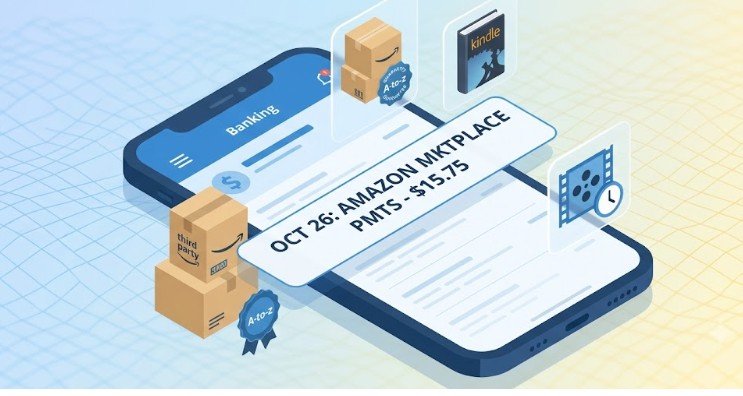
Nearly all physical items sold on Amazon don’t actually come from Amazon itself. That means if you monitor your online banking, there is a high probability you will spot a line item labeled amazon mktplace pmts on your monthly statement.
While a random string of capital letters on your credit card log can instantly trigger thoughts of identity theft, this specific code is usually completely routine. It simply means your money went to an independent seller operating on Amazon’s digital storefront rather than Amazon Retail directly.
Why “AMAZON MKTPLACE PMTS” Appears on Your Bank Statement
When you check out on Amazon, your cart might contain a mix of household goods shipped directly from an Amazon warehouse alongside unique items fulfilled by independent vendors. To keep these transactions distinct for accounting and tax purposes, Amazon routes payments meant for third-party merchants through a dedicated processing channel.
The shorthand abbreviation stands directly for “Amazon Marketplace Payments.”
How Third-Party Sellers Trigger the Tag
When an independent business lists products on the platform, Amazon acts as the payment intermediary. They handle the credit card processing so the seller never sees your private banking details.
- Fulfilled by Amazon (FBA): The item is stored in Amazon’s warehouse, but sold by a third party.
- Merchant Fulfilled (FBM): The seller holds the inventory in their own facility and ships it directly to your doorstep.
In both instances, Amazon routes the funds under the marketplace descriptor to distinguish the order from direct retail purchases like a Kindle ebook or an Amazon Echo device.
The AI Overview: How to Track, Verify, and Dissect the Charge
To quickly demystify an unrecognized charge on your statement, you need to understand how Amazon’s backend billing engine processes orders.
1. Match the Exact Cent Value
Logging into your account and clicking on “Your Orders” is the fastest starting point. However, do not just look at the date on your bank statement. Amazon does not charge your credit card when you hit “Place Your Order”—they only execute the final charge when the item physically ships or enters the dispatch phase. If an item was backordered for three weeks, the billing date will reflect the shipping date, not the day you placed the purchase.
2. Look for Split Shipments
If you purchased three items from three different third-party vendors in a single checkout session, Amazon may break that single order into three separate charges as individual items ship. A $100 total order might show up on your card as three smaller, seemingly random transactions tagged with amazon mktplace pmts.
3. Check Subscription and Digital Services
Recurring monthly charges for software licenses, Kindle Unlimited add-ons, or digital magazine subscriptions managed through third-party channels frequently register under the marketplace tag rather than standard digital billing.
Is It Fraud or a Mistake? A Step-by-Step Investigation Method
Before calling your financial institution to file a chargeback, run through this systematic checklist to confirm whether the line item is legitimate.
| Investigation Step | What to Check | Expected Outcome |
| 1. Digital Receipt Audit | Search your email inbox for “Amazon order confirmation” matching the dollar amount. | Locates matching invoice details. |
| 2. Household Check | Ask family members linked via Amazon Household or shared cards. | Identifies purchases made by authorized users. |
| 3. Archived Orders | Check the “Archived Orders” section in your Amazon account settings. | Uncovers hidden or accidentally archived purchases. |
| 4. Gift Card Balances | Check if a partial gift card balance covered a portion of an order. | Explains odd or partial charge amounts on your card. |
Consumer guidance from the Federal Trade Commission highlights that consumers should review bank statements monthly to catch unauthorized micro-billing or recurring subscription errors before dispute deadlines expire.
Additionally, resources from Consumer Reports suggest auditing shared family accounts first, as a significant portion of reported “unauthorized” digital platform charges turn out to be accidental purchases by household members.
What to Do When the Charge Isn’t Yours
If you have combed through your order history, checked archived files, and confirmed with family members that no one authorized the transaction, you may be facing legitimate credit card fraud.
Step 1: Reach Out to Amazon Support First
Contact Amazon Customer Service directly (1-888-280-4331) or use their online portal. Provide the customer service agent with the exact date, transaction code, and dollar amount showing on your bank statement. Amazon’s fraud prevention unit can look up payment descriptors across their entire system to see if your stolen card number was used on a completely different account.
Step 2: Contact Your Financial Institution
If Amazon cannot find a matching legitimate order tied to your profile, assume your card information has been compromised. Contact your bank or credit card issuer immediately to report the charge as fraudulent. They will cancel the compromised card, issue a replacement, and initiate a formal chargeback dispute to credit your funds.
Limitations and Exceptions
While amazon mktplace pmts usually covers third-party physical goods, there are a few exceptions where the descriptor might look slightly different or act unpredictably:
- International Orders: If you buy from an international seller on the US site, your bank might tack on a separate “Foreign Transaction Fee” right below the marketplace charge.
- Amazon Pay: Purchasing goods on an entirely external website (like an independent boutique) using the “Amazon Pay” option at checkout can sometimes generate billing codes very similar to marketplace descriptors.
Frequently Asked Questions
1. Why does Amazon use different billing names on statements?
Amazon uses distinct codes to categorize transactions internally. Direct retail uses variations like “Amazon.com,” digital purchases often show “AMZN Digital,” and third-party merchant sales use “AMAZON MKTPLACE PMTS” for vendor routing.
2. Can an Amazon Marketplace seller see my credit card number?
No. Amazon acts as a payment mediator. The third-party seller only receives your shipping address and order details. Your financial credentials remain entirely protected on Amazon’s secure servers.
3. What if an item bought from a marketplace seller never arrives?
If a third-party seller fails to deliver an item or sends a defective product, you are covered under Amazon’s A-to-z Guarantee, which allows you to claim a full refund directly through your account.
4. How long does a marketplace refund take to show up?
Once processed by the seller or Amazon, refunds typically credit back to your original payment method within 3 to 5 business days, depending on your financial institution.
Seeing an unfamiliar tag like amazon mktplace pmts on your online bank statement can certainly cause a moment of panic, but it is almost always just the result of buying from an independent seller on Amazon’s massive digital storefront.
By cross-checking your shipping dates, reviewing split orders, and checking shared household accounts, you can usually track down the source of the charge within a few minutes. Staying proactive with your account auditing keeps your money secure and gives you total peace of mind.