Now Reading: How Securly Pass Is Transforming Hallway Management in Modern Schools
-
01
How Securly Pass Is Transforming Hallway Management in Modern Schools

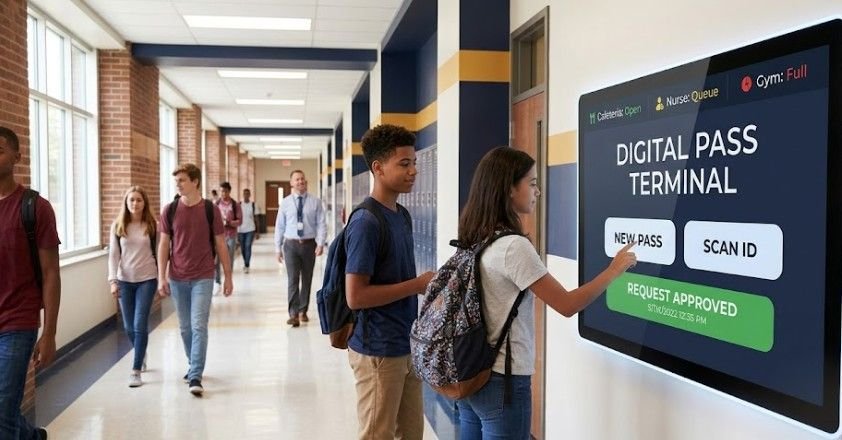
The traditional wooden bathroom pass, once a germ-ridden fixture of K-12 classrooms, is rapidly becoming a relic of the past. Over 60% of modern school safety incidents occur outside the classroom in unstructured spaces like hallways, restrooms, and cafeterias, according to reports by the National Center for Education Statistics. To reclaim lost instructional time and maintain campus safety, thousands of American schools are replacing paper hall passes with digital tracking systems like Securly Pass.
Transitioning to digital pass software is not just about keeping tabs on students. It fundamentally changes how schools manage movement, minimize behavioral disruptions, and handle emergency situations.
What Is Securly Pass?
Securly Pass (formerly known as e-Hallpass) is a cloud-based digital hall pass management system built for K-12 environments. Instead of scribbling on a piece of paper or handing over a plastic lanyard, students use their school-issued devices to request permission to leave class.
The primary goal of the system is simple: reduce hallway clutter, eliminate ghosting (where students wander the halls for extended periods), and provide school administrators with complete visibility over campus traffic.
[ Student Request ]
│
▼
[ Teacher Approval ]
│
▼
[ Active Digital Pass Generated ]
│
┌─────────┴─────────┐
▼ ▼
[ Hallway Check ] [ Auto-Expiration ]
Key Features That Drive Campus Security
Digital pass systems offer administrative controls that traditional paper slips cannot match. Securly Pass relies on several core features to manage daily operations:
- Live Central Dashboard: Administrators and staff can view a real-time visual map of every student currently out of class, their destination, and how long they have been away.
- Contact Control (Pass Restrictions): School leaders can set rules that prevent specific pairs or groups of students from receiving active passes at the same time, curbing potential conflict or coordinated truancy.
- Destination Capacity Limits: Locations like restrooms, media centers, or counseling offices can have hard caps on occupancy. Once a room reaches capacity, the system automatically pauses new approvals.
- Automated Queue Management: If a destination is full, students are placed in a virtual waiting list on their device. When a space clears, the pass generates automatically without disturbing class dynamic.
- Daily and Weekly Pass Limits: Schools can set maximum limits on how many non-emergency passes a student can request per day or week, encouraging better time management during periods.
Step-by-Step: How the System Works in Daily Practice
Understanding how Securly Pass operates during a typical school day helps illustrate why districts are adopting it.
- Requesting Permission: A student opens the Securly Pass application on their laptop or tablet using their existing single sign-on credentials (such as Google Workspace or Microsoft 365).
- Teacher Verification: The classroom teacher receives a discreet notification on their computer. With a single click, they can approve or deny the request without interrupting their lecture.
- Hallway Monitoring: Hall monitors, campus security, or administrators carry tablets or phones logged into the system. If they spot a student in the corridor, they can check their status instantly by searching the student’s name—no paper slip required.
- Substitute Teacher Support: To avoid giving temporary staff administrative privileges, substitute teachers use a unique, school-assigned physical PIN to approve passes directly from a student’s screen.
- Closing the Pass: Once the student returns, the teacher or student ends the timer, accurately logging total time spent out of the classroom.
Digital vs. Traditional Hall Passes
| Feature | Paper / Wooden Pass | Securly Pass |
| Hygiene | Low (shared surface) | High (individual digital devices) |
| Time Tracking | Manual or non-existent | Automatic, down to the second |
| Emergency Visibility | None | Real-time map of all hall traffic |
| Overcrowding Control | Relies on teacher guesswork | Automated room capacity caps |
| Data & Analytics | No records kept | Exportable reports on class disruption |
Real-World Impact: Safety, Time, and Accountability
When a school switches to a system like Securly Pass, the shifts in school culture are immediate. Research published by the U.S. Department of Education emphasizes that clear, consistent behavioral expectations directly correlate with improved academic focus and reduced disciplinary referrals.
Reclaiming Lost Learning Time
A student taking an unmonitored 15-minute bathroom break twice a day loses two and a half hours of instruction every week. Over a school year, that adds up to nearly three full weeks of missed classes. Digital timers create visual accountability, encouraging students to return promptly.
Streamlining Emergency Procedures
During a lockdown, fire drill, or emergency evacuation, accounting for missing students is a top priority. Instead of guessing who was in the restroom, administrators open their live dashboard to see exactly who was in transit and which room they were heading toward.
Supporting Student Wellness
Not all hallway movement is disruptive. Students suffering from chronic health conditions, anxiety, or diabetic needs can have custom, discreet passes pre-approved by the school nurse or counselor. This prevents uncomfortable public conversations in front of peers.
Implementation Challenges and Solutions
No technology rollout is completely seamless. Schools implementing digital pass management frequently navigate a few key hurdles:
- Student Privacy Concerns: A common myth is that Securly Pass tracks students via GPS outside of school. In reality, the software only tracks session duration and destination inputs within school hours—it does not track location off-campus or use device location services.
- Device Reliance: If a student forgets their Chromebook or their battery dies, they cannot issue a pass themselves. In these cases, teachers can manually create a pass on their own computer terminal.
- Tech Overload for Teachers: Switching between teaching tools can cause friction. Districts mitigate this by setting up quick key commands and integrating pass approvals directly into existing browser interfaces.
Frequently Asked Questions
1. Does Securly Pass track students using GPS outside of school?
No. Securly Pass does not use GPS tracking. It only records time durations and locations selected by the student while logged into the school network during school hours.
2. How do substitute teachers man `hyage hall passes using Securly Pass?
Substitute teachers are provided with a temporary, secure PIN by school administrators. They enter this PIN on the student’s screen to approve or end a pass without needing a full software account.
3. Can students bypass the pass limits during real emergencies?
Yes. Teachers always retain manual override capabilities. Emergency visits to the school nurse or main office can be issued instantly regardless of daily pass limits or room capacities.
The shift toward tools like Securly Pass reflects a broader evolution in how K-12 institutions manage campus operations. By trading outdated paper slips for digital visibility, schools can reduce classroom disruptions, address behavioral patterns before they escalate, and ensure every student is accounted for throughout the day. Ultimately, modern hallway management isn’t about control—it’s about creating a safe, structured environment where learning remains the primary focus.