Now Reading: How to Play Roblox Unblocked: The Complete Network Bypassing & Safety Guide
-
01
How to Play Roblox Unblocked: The Complete Network Bypassing & Safety Guide

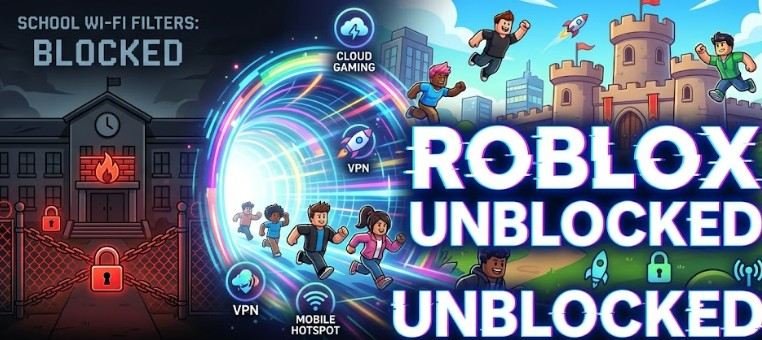
School networks and workplace Wi-Fi block Roblox for one main reason: bandwidth control. Streaming 3D graphics and multi-player game traffic consumes massive amounts of network data, which slows down essential tasks for everyone else.
Finding a way to access roblox unblocked isn’t just about breaking past a login wall; it’s about understanding how traffic filtering works so you can access your profile safely without risking your account security or getting your device flagged.
Why Managed Networks Block Roblox (And How Filters Work)
Most educational institutions and corporate environments use Next-Generation Firewalls (NGFWs) alongside content filtering engines like Lightspeed Systems, Securly, or Fortinet. According to research on educational technology policy from the National Center for Education Statistics, network administrators enforce strict web filtering policies to maintain compliance with federal guidelines like the Children’s Internet Protection Act (CIPA).
These systems block games through three distinct layers:
- DNS Filtering: Resolves domains like roblox.com to a dead-end IP address or block page.
- URL/Category Blocking: Scans web requests for keywords associated with gaming or entertainment.
- Port Blocking: Shuts down standard UDP ports used by the Roblox client application to communicate with multiplayer servers.
When a device attempts to launch the native desktop application or navigate directly to the Roblox website, the firewall immediately recognizes the signatures of those data packets and drops the connection.
The Top 4 Methods to Access Roblox Unblocked
Different networks require different tools. Depending on whether you are using a locked-down Chromebook, a personal Mac, or a PC, one of these four solutions will serve as your best route.
1. Cloud Gaming Platforms (Best for Managed Chromebooks)
Cloud streaming is the most reliable method for hardware-restricted devices like school Chromebooks. Services like now.gg stream the rendered video of the game directly to your web browser.
Because the game executes on a remote cloud server rather than your local machine, your browser only sends input commands and receives a video feed. The network filter sees standard HTTPS web traffic instead of gaming data packets.
2. Web Proxies and Mirror Sites
Web proxies act as an intermediary layer between your web browser and the internet. When you enter a URL into a proxy site, the proxy fetches the content on its own server and passes the rendered HTML back to you.
While proxies effectively bypass basic URL and DNS blocks, they often struggle with complex JavaScript engines and 3D rendering. They serve best as a quick workaround for basic account management or light web tasks rather than high-frame-rate gameplay.
3. Virtual Private Networks (Best for Personal Laptops)
A Virtual Private Network (VPN) creates an encrypted tunnel between your local device and a private server. Once connected, your school or office firewall cannot inspect your data traffic; it only sees encrypted information flowing to a single IP address.
A VPN bypasses DNS blocks, URL filters, and port restrictions simultaneously. However, installing a reputable VPN client requires administrator rights, making this option ideal for personal devices brought onto guest Wi-Fi networks rather than managed school hardware.
4. Cellular Mobile Hotspots (The Zero-Risk Bypass)
Disconnecting your personal device from the local Wi-Fi entirely eliminates local network restrictions. By turning on your smartphone’s personal hotspot, your laptop or tablet routes all connection requests through your cellular provider’s towers.
This method completely avoids the local firewall, making it the safest option for keeping your browsing habits entirely separate from network monitoring logs.
Technical Comparison of Bypassing Methods
Evaluating your hardware constraints helps select the right approach without wasting time on incompatible methods.
| Method | Risk Level | Setup Speed | Hardware Requirements | Ideal Scenario |
| Cloud Gaming | Low | Very Fast | Standard Web Browser | Restricted Chromebooks |
| Web Proxies | Medium | Fast | Any Modern Browser | Simple URL Block Bypassing |
| Mobile Hotspot | Low | Instant | Cellular Data Plan | Personal Laptops / Tablets |
| VPN Software | Low | Medium | Admin Privileges | Full Client Unblocking |
Critical Safety Protocol: Protecting Your Account and Hardware
Attempting to access roblox unblocked mirror sites can expose your device and personal data to security risks if you don’t take proper precautions.
Avoid the VNG Regional Server Lock
When browsing third-party proxy mirrors or cloud streaming instances, pay close attention to the login domain. If a proxy routes your connection through Southeast Asian nodes, it may redirect you to the Vietnam-specific version of Roblox (VNG).
Logging into a VNG-tagged portal can trigger an automatic, permanent region migration on your main account. This locks your profile to Vietnamese servers, preventing you from trading items or playing with international friends on standard servers.
Beware of Phishing Clones and Credential Harvesters
Dozens of websites masquerade as “unblocked game hubs” solely to harvest user credentials. Never enter your main account password into a login screen embedded within an unfamiliar URL frame.
- Always verify that the address bar displays the official domain or an established cloud gaming domain.
- Enable Two-Step Verification (2FA) using an authenticator app or email confirmation. If an unverified proxy attempts to steal your password, 2FA prevents unauthorized account access.
Session Clean-Up on Public Terminals
If you play on a shared library or school computer, leaving your session active leaves your account vulnerable to the next user. When finishing a session:
- Log out completely from the game interface.
- Clear your browser history, cache, and saved cookies.
- Close all open browser windows to drop active token authorization.
Guidance from the Federal Trade Commission on digital privacy highlights that unencrypted public logins and uncleared browser caches remain a primary entry point for account hijacking.
Frequently Asked Questions
1. Can my school see if I use a proxy or cloud site?
Yes. While network admins cannot always see the exact gameplay inside an encrypted cloud stream, their logs will show your IP address connecting to known proxy domain names and consuming high amounts of data bandwidth.
2. Why is my cloud gaming stream lagging so badly?
Cloud streaming requires stable, low-latency internet. If your Wi-Fi signal is weak or the network throttling limits video data rates, your stream will experience input lag, frame drops, and choppy visual rendering.
3. Will using a VPN to unblock Roblox get my account banned?
Roblox permits VPN usage for privacy purposes. However, using a VPN to bypass regional pricing, cheat, or hide inappropriate chat behavior violates the Terms of Service and will result in an account suspension.
Finding the Right Balance
Getting roblox unblocked on restricted networks comes down to choosing the method that fits your hardware constraints while keeping your account secure. Cloud gaming platforms remain the top choice for locked-down Chromebooks, while mobile hotspots and VPNs offer seamless performance for personal devices.
Prioritize account safety above quick access. Avoid suspicious proxy mirrors, stick to trusted web portals, keep your two-factor authentication enabled, and always clear your cache on public devices when your session ends.