Now Reading: Unlocking Delta iOS: The Retro Gaming Revolution on Your iPhone
-
01
Unlocking Delta iOS: The Retro Gaming Revolution on Your iPhone

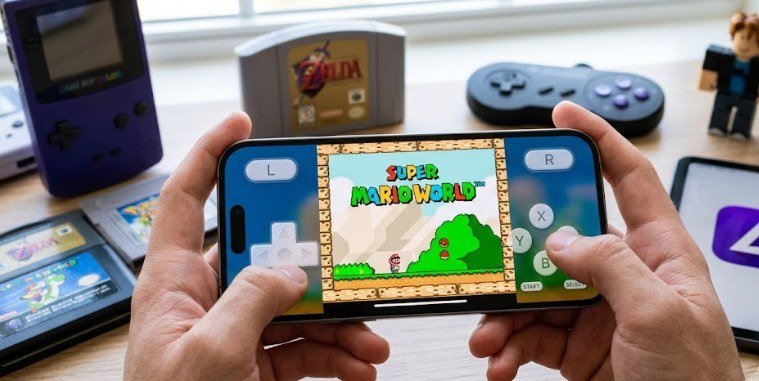
In April 2024, Apple quietly made a seismic policy change to its App Store guidelines, legalizing retro video game emulators for the first time in iPhone history. Within 24 hours of its launch, the free delta ios app skyrocketed to the number one spot on the US App Store charts, dethroning social media giants and productivity tools overnight.
What makes this milestone wild is that delta ios turns your sleek iPhone into a fully functioning Game Boy Advance, Super Nintendo, and Nintendo 64—without requiring complex jailbreaks or sketchy third-party web installers. However, while millions rushed to download it, search results reveal that the term “Delta iOS” actually points to three very different digital tools.
What Is Delta iOS? Decoding the Three Different Meanings
If you search for “Delta iOS” in the App Store, you might find yourself looking at three completely unrelated applications. Clarifying which one you need prevents accidental downloads, broken setups, or security headaches.
1. Delta Game Emulator (The Primary Topic)
Developed by software creator Riley Testut, Delta is an all-in-one retro video game emulator designed specifically for iOS and iPadOS. It acts as a digital console wrapper that lets you run backed-up classic games directly on modern mobile screens, complete with custom tactile skin overlays and controller support.
2. Fly Delta App (Delta Air Lines)
For travelers, “Delta iOS” often refers to the official Fly Delta application published by Delta Air Lines. This travel manager uses native Apple features like Dynamic Island and Live Activities to display real-time gate changes, digital boarding passes, and flight updates.
3. Delta Executor (Roblox Utility)
In gaming communities, Delta can also refer to a third-party modification tool used to inject custom scripts into Roblox on mobile devices. Using unauthorized exploit executors violates terms of service agreements and carries a high risk of account suspension or malware infection.
How Delta Works: Supported Systems and Key Features
Delta operates as a multi-system front-end. Instead of downloading six separate apps for different classic consoles, Delta houses multiple emulation cores inside a single native user interface.
- Nintendo Entertainment System (NES)
- Super Nintendo Entertainment System (SNES)
- Nintendo 64 (N64)
- Game Boy & Game Boy Color
- Game Boy Advance (GBA)
- Nintendo DS (NDS)
- Sega Genesis (Available via beta and select builds)
Delta includes modern quality-of-life enhancements that classic hardware never offered. You can create instantaneous “Save States” to pause games anywhere, enable fast-forwarding to skip slow cutscenes, and map external Bluetooth controllers like PS5 DualSense or Xbox Wireless controllers. It also utilizes Delta Sync, which uses Google Drive or Dropbox to sync your save files seamlessly across your iPhone and iPad.
The Legal and Financial Reality of Mobile Emulation
Emulation software itself is completely legal in the United States. According to legal precedents set by landmark cases like Sega v. Accolade, reverse-engineering console hardware to create compatibility software does not violate federal copyright law.
However, the games themselves (ROM files) are protected intellectual property. Downloading copyrighted ROMs from random internet archives remains illegal under United States copyright laws enforced by agencies like the U.S. Copyright Office. To stay legal, players must extract ROM files from physical cartridges they already own using hardware ripping tools.
From a personal finance perspective, retro gaming through delta ios offers a massive budgeting win for cash-conscious gamers.
| Option | Cost Range | Portability | Setup Time |
| Original Retro Hardware | $150 – $500+ | Low (bulky, physical media) | Medium |
| Retro Handheld Clones | $50 – $180 | Medium | High (MicroSD management) |
| Delta iOS App | $0 (Free) | High (Always on your phone) | Under 5 minutes |
According to financial capability metrics published by the Consumer Financial Protection Bureau, cutting unnecessary micro-entertainment subscriptions and hardware spending is one of the fastest ways for young adults to build early emergency savings. Using software you already own on your iPhone saves hundreds of dollars annually compared to buying inflated secondary-market retro cartridges.
Quick Setup: How to Get Started with Delta iOS
Getting delta ios running on your iPhone takes less than five minutes and requires zero technical background.
- Download the App: Open the official Apple App Store, search for “Delta Game Emulator,” and tap download. (European Union users can also download it via AltStore PAL).
- Import Your ROMs: Transfer your legally owned game files (.gba, .nds, .n64, .snes) to your iPhone’s Files app or iCloud Drive.
- Load the Library: Open Delta, tap the + icon in the top-right corner, select Files, and pick your game folder.
- Add DS Bios Files (Optional): To play Nintendo DS titles, Delta requires three free system system files (bios7.bin, bios9.bin, and firmware.bin) which can be mapped in Delta’s settings menu.
Limitations and Common Misconceptions
While Delta is an incredible piece of software, new users should be aware of a few practical trade-offs:
- Battery Drain: N64 and Nintendo DS emulation relies heavily on the iPhone’s GPU, which drains battery life faster than standard social media apps.
- Touchscreen Precision: Virtual touch buttons work great for turn-based RPGs (like Pokemon), but precision platformers (like Super Mario) feel significantly better with a physical controller attached.
- No Built-in Games: Delta does not come with pre-installed games. You are entirely responsible for sourcing your own legal game files.
Frequently Asked Questions
1. Is Delta iOS completely safe to install?
Yes. Delta is officially distributed through the Apple App Store, meaning it passes Apple’s strict sandboxing, security, and privacy vetting standards. It contains no tracking scripts or invasive ads.
2. Do I need to jailbreak my iPhone to use Delta?
No. Thanks to Apple’s updated App Store policies, Delta installs like any standard mobile app without needing jailbreaks or complex developer workarounds.
3. Where do I get games for the Delta emulator?
You must supply your own game files (ROMs) by creating digital backups from physical cartridges you legally own. Delta does not provide or distribute game files.
4. Can I connect a controller to Delta iOS?
Yes. Delta features full plug-and-play support for Bluetooth controllers, including Nintendo Switch Joy-Cons, PlayStation DualSense, Xbox Wireless controllers, and MFi accessories.
Conclusion
The emergence of delta ios marks a massive win for mobile tech, gaming preservation, and smart personal budgeting. By transforming your iPhone into a multi-console power station, Delta delivers hundreds of hours of classic gaming entertainment completely free of cost, monthly subscriptions, or predatory microtransactions.
It shows how leveraging software tools on devices you already own can maximize fun while protecting your wallet. If you want to dive deeper into retro gaming on mobile, check out our guide on finding the best budget-friendly Bluetooth controllers for iPhone.