Now Reading: Nintendo Switch ROMs: File Formats, Legal Dump Methods, and System Safety
-
01
Nintendo Switch ROMs: File Formats, Legal Dump Methods, and System Safety

The preserve-or-prosecute war surrounding digital gaming reached a major turning point when Nintendo aggressively dismantled key emulation ecosystems, sending ripple waves across the homebrew community. Amid high-profile legal takedowns, interest in Nintendo Switch ROMs remains exceptionally high among archivists, modders, and everyday gamers trying to preserve their purchased media.
Understanding how Nintendo Switch ROMs function—and navigating the legal boundaries of digital game backups—requires cutting through a dense web of file extension jargon, hardware exploits, and software security risks.
Here is what every Switch owner needs to know about system backups, digital formats, and preserving hardware integrity safely.
What Are Nintendo Switch ROMs?
A Nintendo Switch ROM is a digital copy of software designed for the Nintendo Switch hybrid console. These image files contain the full game code, texture assets, and audio data necessary to load titles either through emulators on alternative systems or directly on modified Switch consoles.
Unlike legacy retro systems, modern console backups mirror complex distribution environments. Switch software exists as base games, mandatory title updates, downloadable content (DLC), and system patch dependencies. Consequently, managing digital Switch files involves handling different container types:
┌─────────────────────────────┐
│ Nintendo Switch ROMs │
└──────────────┬──────────────┘
│
┌───────────────────────┴───────────────────────┐
▼ ▼
┌──────────────────┐ ┌──────────────────┐
│ Physical Dumps │ │ Digital Dumps │
│ (Cartridges) │ │ (eShop / DLC) │
└────────┬─────────┘ └────────┬─────────┘
│ │
▼ ▼
XCI Files NSP Files
(Raw Image) (Pkg Format)
│ │
▼ ▼
XCZ Files NSZ Files
(Compressed) (Compressed)
Physical vs. Digital File Structures
- NSP (Nintendo Submission Package): The default file format used for official digital distribution on the Nintendo eShop. NSP files mimic the structure of digital purchases, packaging the base executable alongside digital distribution signatures.
- XCI (NX Card Image): A bit-for-bit raw extraction of physical retail game cartridges. XCI files replicate the internal storage memory layout of standard game cards, including card header info.
- NSZ and XCZ: Heavily compressed variants of NSP and XCI files. These formats use block-level compression algorithms to shrink overall file sizes for storage efficiency without corrupting the underlying data assets.
The Legal and Security Reality of Game Backups
The legality of system ROMs centers on copyright ownership and the physical acquisition method. Under United States copyright laws, downloading copyrighted game files from public index websites constitutes illegal copyright infringement—even if you already own a physical copy of the cartridge.
Legal protection focuses primarily on personal preservation. Organizations like the Electronic Frontier Foundation advocate for digital consumer rights and fair use preservation principles. However, circumventing digital rights management (DRM) or technical protection measures remains strictly targeted by hardware manufacturers under federal anti-circumvention laws.
┌────────────────────────────────────────────────────────┐
│ Acquisition Spectrum │
└───────────────────────────┬────────────────────────────┘
│
┌─────────────────────────┴─────────────────────────┐
▼ ▼
┌─────────────────────────┐ ┌─────────────────┐
│ Legitimate Dumping │ │ Public Websites │
├─────────────────────────┤ ├─────────────────┤
│ • Uses personal console │ │ • Piracy hubs │
│ • Your purchased games │ │ • Malware risk │
│ • Legal gray area │ │ • Direct breach │
└─────────────────────────┘ └─────────────────┘
Beyond copyright liabilities, third-party download portals carry severe digital security risks. Security researchers frequently uncover malware, keyloggers, and ad-tracker payloads bundled inside executable installers hosted on public distribution hubs. Navigating unknown file repositories places your personal network and hardware at risk.
How Legitimate Backup Dumping Works
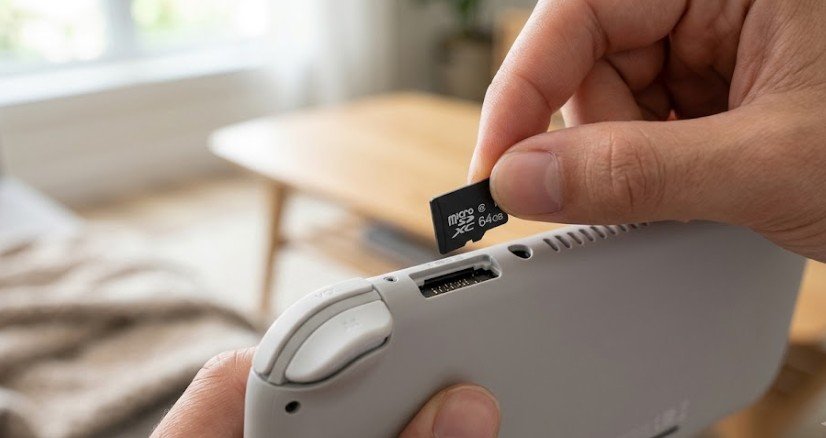
The only legitimate way to obtain a functional backup of a game you own is through a process called “dumping.” This procedure extracts the clean game data straight off your personal media onto an encrypted microSD card.
To convert a physical cartridge into a digital backup, homebrew developers rely on personal hardware modifications:
- Hardware Audit: Determining if your primary Switch console features an unpatched boot ROM vulnerability (often early hardware models susceptible to hardware exploits).
- Custom Firmware Deployment: Injecting custom firmware (CFW) such as Atmosphere via custom payload tools.
- Homebrew Utility Execution: Running trusted open-source extraction software like NX Dump Tool straight from your system menu.
- Data Extraction: Reading data blocks directly from an inserted cartridge or internal eShop storage, outputting a clean NSP or XCI file to your local SD card.
Doing this keeps your unique console keys private while ensuring your backup software stays uncorrupted by unauthorized third parties.
Comparing Switch Backup File Formats
Choosing between file formats comes down to storage needs and installation targets.
| Format | Source Type | Primary Advantage | Typical Storage Use |
| NSP | eShop / Digital | Native digital installation | Standard (1x size) |
| XCI | Physical Cartridge | Exact raw physical media clone | Full dump size |
| NSZ | Compressed NSP | Reduces storage overhead | Highly compressed (up to 60% smaller) |
| XCZ | Compressed XCI | Ideal for archiving physical collections | Highly compressed archive format |
Navigating the Modern Emulation Landscape
Emulation has evolved rapidly due to recent high-profile legal battles. Federal court injunctions against popular open-source software like Yuzu, alongside the shutdown of projects like Ryujinx, scrubbed massive code repositories from public platforms.
┌──────────────────────────────────────────────────────────────┐
│ Modern Emulation Ecosystem │
└──────────────────────────────┬───────────────────────────────┘
│
┌────────────────────────┴────────────────────────┐
▼ ▼
┌──────────────────────────┐ ┌──────────────────┐
│ Native PC Emulators │ │ Legacy Systems │
├──────────────────────────┤ ├──────────────────┤
│ • Legal disruptions │ │ • RetroArch │
│ • Deprecated software │ │ • Multi-system │
│ • High hardware demand │ │ • CFW on Switch │
└──────────────────────────┘ └──────────────────┘
For users looking into legacy preservation, platforms like RetroArch showcase how open-source frontends run older historical titles safely across modern hardware, prioritizing code preservation without violating modern console digital ecosystems.
Checklist: Protecting Your Switch Hardware and Backups
If you manage your own system software and game library, run through this quick security checklist:
- Never share console-unique keys: Your console cryptographic keys (PROD.KEYS) are tied exclusively to your account hardware. Sharing them online breaks terms of service and risks permanent hardware bans.
- Keep backups isolated: Store raw dumps on dedicated external hard drives offline to protect against storage corruption or accidental loss.
- Verify file integrity: Run checksum verifications (like MD5 or SHA-256) on your personal dumps to ensure extraction occurred cleanly without bad data sectors.
- Maintain dual-boot environments: Use an isolated EmmuMMC (emulated NAND) when testing homebrew to protect your main system firmware (SysNAND) from getting banned from official network play.
Limitations and Common Misconceptions
Several myths surrounding system homebrew confuse everyday hardware owners:
- Misconception: Custom firmware automatically means software piracy. Custom firmware simply grants root-level access to hardware you own. Developers use CFW for custom themes, interface tweaks, and saving game states.
- Misconception: Compressed NSZ files lose audio or visual quality. Unlike video compression, compression for game files is lossless. When loaded by a reader tool, the system decompresses the exact underlying code instantly without dropping assets.
- Limitation: Hardware Revisions. Newer Switch models feature patched hardware boot ROMs. Setting up software extraction on these newer devices requires specialized physical hardware modifications, making DIY dumping far less accessible for non-technical users.
Frequently Asked Questions
1. Is downloading Nintendo Switch ROMs legal if I already own the physical game?
No. Downloading game ROMs from public online repositories is illegal copyright infringement in the US, regardless of whether you own a physical cartridge. Legal game backups must be extracted directly from your own media.
2. What is the difference between NSP and XCI files?
NSP files represent digital eShop packages, updates, and DLC items. XCI files are direct bit-for-bit raw clones extracted from physical retail game cartridges.
3. Can downloading ROMs infect my computer with malware?
Yes. Unverified public ROM distribution sites regularly bundle ad-trackers, unwanted bloatware, and malicious executables inside archive downloads. Always use trusted extraction tools on your own hardware.
4. What software is used to dump Switch game cartridges?
Homebrew utilities like NX Dump Tool are commonly used on customized firmware setups to safely extract raw game code from physical media onto a local SD card.
Keeping System Preservation Safe
Navigating Nintendo Switch ROMs requires balancing hardware enthusiasm with legal and security awareness. While public download portals present severe copyright issues and security risks, learning how system file formats like NSP and XCI work empowers you to understand modern digital software distribution. By maintaining hardware security and focusing on clean personal backups, you can protect both your software collection and hardware integrity for years to come.